So much for repeatable process. Warning: If you’re reading this, it’s very likely that you don’t care. This is a long string of notes to myself about what goes wrong with formatting.
BLUF: Checklist updated with: Check cellTable and span numbers from highest to lowest. cellTable should be in single digits. span should not exceed 20.
Somehow, I ended up with two cover images in the .epub file. The biggest issue this causes (aside from the spare image floating around, somewhere) is that it renumbers my paw from image0002 to image0003.
I’m pretty sure this is where it is supposed to be:
<p class="para3"> </p>
If I’m right, then
.para3 { border: none; margin: 0.0500in 0.0000in 0.0500in 0.0000in; text-indent: 0.5000in;}
is the one that I need to edit.
I can has pawz!
Searching for Liberation Sans with numbers, I found this:
.span0 { font-family: 'Bahnschrift SemiBold'; font-size: 32.0000pt;}.span1 { font-family: 'Linux Libertine G'; font-size: 54.0000pt; font-weight: bold;}.span8 { font-family: 'Liberation Mono'; font-size: 10.0000pt; font-weight: bold;}
Where is that coming from?
Find: span0
No matches were found.
Find: span1
No matches were found.
Find: span8
It’s in the character sheet of chapter 1, which does indeed preview as a mono-space font.
It’s in the master .odt file that way. The master .odm file has the right font, the wrong column widths (which doesn’t matter much because that needs manual style overrides, anyway), and “Helth”, not “Hlth”. The source .odt file has the same issues, which is good, but I’m not sure why. I thought I fixed all of that – especially in the early chapters that I was testing.
The next character sheets (in chapter 3) look good from end-to-end. Another round of copy/paste and regen to fix chapter 1…
Bonus side-effect: I figured out where the extra cover image is coming from! It’s embedded in the front matter and I’ve updated the external cover without updating the internal one. Easy fix; at least it seems so.
Image0002 is still the other cover image. It is not referenced in the style sheet, but it’s still embedded. It’s in section0001.xhtml, which is the above referenced “front matter”. It displays just fine in the .epub preview. The problem is, the .odt file is showing me the new image, not the old one. Where did this come from?
What’s super weird: I went looking for the image file so I could delete it so it couldn’t be referenced. I can’t find it. It must be lurking _somewhere_. I’d use Windows Search to find the file, but Windows Search. What’s the point in trying?
Ah hah! Export from .odt to .epub, I was doing it wrong. Back to just two images, yay!
Back to the font issues…
.span0 { font-family: 'Bahnschrift SemiBold'; font-size: 32.0000pt;}.span1 { font-family: 'Linux Libertine G'; font-size: 54.0000pt; font-weight: bold;}.span2 { font-family: 'Bahnschrift Light'; font-size: 26.0000pt;}
Those are the ones that do not belong. Given their numbers, I’m betting this is caused by the out-of-date front matter document, too.
<p class="para0"><span class="span0">M.R. SIZER</span></p>
Yep. No festive fonts in the front matter. It gets the same fonts as everything else.
I’m debating using “RIZES” as my pseudonym. This is different:
<p class="para0"> <span class="span0">M.R. </span> <span class="span0">R</span> <span class="span0">IZE</span> <span class="span0">S</span></p>
They’re all span0, so I suppose it doesn’t matter. It’s still weird, though.
On the bright side, all the font-family styles are Liberation. Why are there so many of them?
.span0 { font-family: 'Liberation Sans2'; font-size: 32.0000pt;}.span1 { font-family: 'Liberation Serif'; font-size: 54.0000pt; font-weight: bold;}.span2 { font-family: 'Liberation Sans2'; font-size: 26.0000pt;}.span4 { font-family: 'Liberation Serif1';}.span5 { font-family: 'Liberation Sans2'; font-size: 130.0000%; font-weight: bold;}.span6 { font-family: 'Liberation Sans3'; font-size: 10.0000pt; font-weight: bold;}.span7 { font-family: 'Liberation Sans3'; font-size: 10.0000pt; font-style: italic; font-weight: normal;}.span8 { font-family: 'Liberation Sans4'; font-size: 10.0000pt; font-weight: bold;}.span9 { font-family: 'Liberation Sans3'; font-size: 10.0000pt; font-style: normal; font-weight: bold;}.span16 { font-family: 'Liberation Sans3'; font-size: 10.0000pt; font-weight: bold; text-decoration: line-through;}
Legitimacy check:
- span0 – Author Name on the title page.
- span1 – Title on the title page.
- span2 – Series Title on the title page.
- span4 – the copyright symbol on the title page; weird, but whatevs (span3 exists, it doesn’t reference a font).
- span 5 – Chapter Titles
- span 6, which seems to duplicate span 8. Because it does. span6 is the “System Sheet” style. span8 is the “System Notification” style. They both use the same font.
- span 7 – I’m betting on the “System Perspective” style. Yep.
- span 9 – I’m betting on the I-Shall-Not-Be-Removed “Text body indent” style. I hate that thing and I can’t make it go away. I think there’s a reference in the template that I can’t find. Huh. It appears to be what used to be italics that I have since removed. I’ll see if I can make that go away.
- span 16 – no idea how that happened. There is ONE strike-through character in the entire book. Removed.
I tried to remove span9 through chapter 8. It’s a rather painful process. Let’s see if it worked.
span9 is still there, but does it appear before chapter 9? Yep. Still in chapter two. I admit defeat. One cannot see it because it’s identical to spans 6 and 8, which are legit. I don’t care.
Old span16 is gone. The new one is just as mystifying:
.span16 { font-effect: outline; font-family: 'Liberation Sans1'; font-size: 10.0000pt; font-style: normal; font-weight: bold; text-shadow: 1px 1px 1px #666666;}
text-shadow? What’s that? Oh! That’s the horrible blurriness I’ve noticed and had no idea what was causing it. That must die. All in chapter 14 for some reason. span13 is the same thing. This seems to be originating in the Skills spreadsheet and then being copy/pasted all over the place.
It’s a real rendering issue. Fixed, I think. And I need to remember: Always Paste Unformatted from the spreadsheets (except tables, paste those as RTF).
Grrr. Still there. spans 15 and 20, now, so they show up later. span15 was only in chapter 14; “was” being the key word. span20 was only in chapter 27. Definitely copy/paste from the Skills spreadsheet.
Will this ever end? span13 is used only for the title of five apparently random chapters. Just the title, not the “Chapter X” text that appears in all of them. How did that happen?
Font cleanup looks reasonable. Now to fix the font-family lines. That’s actually on the checklist. The surprise was how many there were.
BTW: I’m doing this now so hopefully the document will _stay_ cleaned up. If it doesn’t I want to know what I’m doing that corrupts it. It also makes reading the Kindle version less painful.
Next up: The paw. Thankfully, it shows up near the front so it’s easy to find its para number. Still 3. Still exported as junk. Fixed.
Next up: The character sheet tables. They also show up in chapter 1, so also easy to find and unlikely to renumber. table0, rowTable0, cellTable0, para1, span8
This is too hard to read without formatting:
<tr class="rowTable0"> <td class="cellTable0"> <p class="para6"><span class="span8">Str:</span></p> </td> <td class="cellTable1"> <p class="para6"><span class="span8">11 (11/11)</span></p> </td> <td class="cellTable2"> <p class="para6"><span class="span8">Dex:</span></p> </td> <td class="cellTable1"> <p class="para6"><span class="span8">6 (6/6)</span></p> </td></tr>
I was right: cellTable1 is reused. cellTable0 _should_ be. They’re actually not bad. 0.7701, 0.7493 and 1.2507.
And back into the extraneous styles problem.
Character sheets are my only tables. Why do the cellTable numbers go up to 12? There are only two table styles: table0 (width: 4.0208in) and table1 (width: 4.1208in).
table1 makes sense! There are places where our intrepid heroes only pull up partial stats. That’s table1. The full sheets are (I’m assuming without a thorough check) table0.
That’s an awful lot of cellTable styles for two tables.
cellTable12 is way out in Chapter 26. It hasn’t been repasted from the new width spreadsheets. This is legitimate. Wrong due to user error, but legitimate.
I fixed it more to be sure the fix works than because I care, right now.
Arg. If I regenerate, all the font changes will be lost. Consistency matters. I’m pressing on with verifying the table styles.
cellTable9 is the new maximum. Chapter 11. Marcy’s character sheet. It looks OK. The spreadsheet version looks right (although the 24 subchapter tabs of chapter 27 all need their column widths set; I haven’t pasted them anywhere, yet). It has something to do with the colspan=3 for the first three lines of the table. The stats part uses the existing styles. I don’t think I care. It’s reused in chapter 16. Seems fine.
cellTable8 appears to be the same thing in different chapters, but something does go awry with Tom’s character sheet in chapter 11. It’s the old column widths, still. Fixed. Luke’s is fine, but a later-in-chapter snippet is wrong. And that was it for cellTable8.
cellTable7 is also just chapter 11. Fixing 8 probably fixed this, too.
cellTable6 is that partial sheet I mentioned above. I’m fixing those just so they don’t keep showing up when I cross-reference like this.
Victory! Only one table style, only one rowTable style, and only four cellTable styles.
I still think there are too many span styles. One last check since working from the large numbers back worked so well with the cellTable checks.
span18 – shows up in chapter 27 in a subchapter title. That would be fine, except it first shows up for 27.10. 27.16 was the only other place. Fixed, I think.
span 17 is the nominal Heading2 style in chapter 27.
span 16 is a superscripted “th” in chapter 25.
span 15 is just another italicized quote. They’re everywhere. No idea why this one generated a new style. I don’t care. It’s not visible.
span 14 is bold and italic, which is rare. It first shows up in chapter 18.
span 13 shows up once in chapter 23 for no apparent reason. I think I’ve figured this out. It’s in other chapters, too. This is an artifact of me changing my mind. For example, italicizing something then putting it back to normal. That doesn’t remove the formatting block; it just makes that block the same as what’s around it. The epub conversion doesn’t recognize that they’re the same style. This is weird, but not visible, so I don’t care.
Checklist updated with: Check cellTable and span numbers from highest to lowest. cellTable should be in single digits. span should not exceed 20.
font-family fixed, again. paw fixed, again. Kindle download pending.
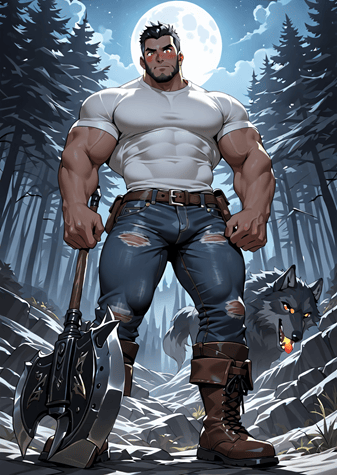
All that deserves a rejected image: So close, yet so far. Too much orange blush. He’s not holding the axe; it’s just floating there. The wolf has orange sties in his eyes – and his tongue is on fire.
Update:
Hard page breaks don’t seem to convert. They just disappear. Not sure what to do about that.
If you wonder why I take such detailed notes, it’s to easily recover from iatrogenic mistakes. I didn’t merge-cell the first three rows of all the character sheets I “fixed” above. How convenient that there is a list right here.

