
Because there’s always a “two”. Tonight’s plan of attack is to fix the spreadsheet layout so it fits on a Kindle screen. I’ve always known this was a risk. It has come to pass.
Since I haven’t caught up to the end of the book with the first round of spreadsheet changes, it seems wiser to make the second round of changes and start over rather than changing chapters 19-26 twice.
For the first pass, I only changed Tom and Luke’s spreadsheet. There are four others that will need the formatting change even if I continue to copy/paste numbers between tabs.
To change this:
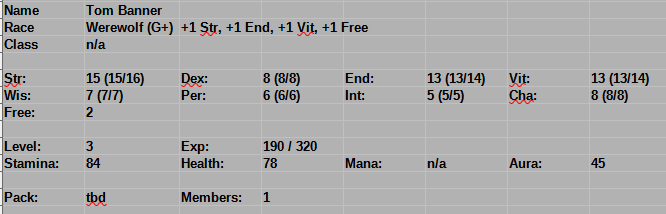
to this:
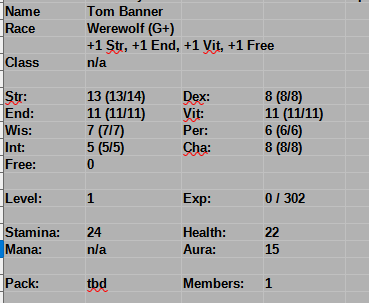
Is five “Insert Row Above” per tab and three ctrl-X/ctrl-Vs per character sheet (Tom and Luke share tabs; so does The Squad; etc…). It seems to not screw up the formulas, so that’s nice.
I’ve been using “Paste Unformatted” and changing the style when copying from spreadsheets to text. With this more compressed version, I think I’ll give tables a try.
I will experiment with the first chapter or two from end-to-end before committing to anything.
I’m doing the brainless epub conversion, so it may or may not work with tables, even if they looks fine in my local .odt copy.
That brainless conversion lost my paw print. Yikes! That was way back in June. I’m going to at least figure out how to save it, even if I choose not to.
Tables don’t paste between Libre spreadsheets and documents. The column widths are all screwy and column spanning breaks. Every single paste would need to be manually edited. Not happening.
I got cover.png to work from the “media directory”. So far no joy on the paw. I can’t figure out where the template is getting it.
The spreadsheet pasted as styled text is close to right, but distressing. If I have no other choice, I’ll put up with it. I’m going to try adding a new style to the template that uses a fixed point font.
That made the on-screen version look as if it just popped out of a teletype. The Kindle version was, surprisingly, unchanged.
After searching, I found the style sheet (Calibre is good at that). My “character sheet” style became .span4, because of course it did.
I changed the font-family from ‘Liberation Mono’ to monospace. That did what’s on the tin, but the tabs are horribly wide.
While I was digging around in the XML, I discovered that my horizontal line with a paw in it became .para2. I manually typed *** into the paragraph and it showed up as expected. text-align: center in the stylesheet put it where it belonged.
Adding paw.png to the images directory and url(../images/paw.png) to the .para2 style did not do anything, as far as I can tell; either to the Calibre preview or the Send to Kindle conversion.
The cover image (image0001.png, of course) has a rectangle icon next to it. paw.png does not. Choosing “Open OEBPS/images/paw.png” with Paint does open the right thing.
Ah hah! background-image: url(), not just a naked url(), which is not cool. Here’s the preview:

It’s kind-of there. How did we do this without AI?
background-repeat: no-repeat; background-position: center; Now there is just one under the asterisks. It’s still cropped, which just means it is too big. I can fix that. I wonder if there is a background-scale… Sort-of: background-size: contain;
I can has paws, even it takes a pass through Calibre, it’s just the style sheet. It’s easy to find: It’s the only para with a border attribute. It needs to look like this:
.para2 { border: none; margin: 0.0000in 0.0000in 0.1000in 0.0000in; text-indent: 0.5000in; text-align: center; background-image: url(../images/paw.png); background-repeat: no-repeat; background-position: center; background-size: contain;}
Now let’s see if I can fix .span4
.span4 { font-family: monospace; font-size: 10.0000pt; font-weight: bold;}
The font size looks fine. The weight makes it look like the teletype has a brand new ribbon in it. It’s the tab ident that’s dreadful. .span4 is, logically enough, inside .para4.
.para4 { margin: 0.0000in 0.0000in 0.0201in 0.0000in; text-indent: 0.0000in;}
How does CSS work with tabs?
white-space: pre prevents the typical whitespace collapse, much as the code blocks above. tab-size: X makes the tabs X characters. Let’s see what that does to .span4.
Not works. .para4? Nope. tab-size is highlighting differently than the rest. I’m doubtful that it’s a valid attribute name. And there’s this
How tab stops work in monospace:
- A tab advances the cursor to the next multiple of
tab-sizefrom the start of the line.- So with
tab-size: 4, a tab after 1 character renders as 3 spaces, while a tab after 4 characters renders as 4 spaces. The rendered width is not always equal totab-size— it’s the distance to the next stop.- Because every character is the same width, this produces perfectly aligned columns.
That’s problematic. It’s also not what’s in the XML.
<p class="para1"> <span class="span1">Luke saw</span></p><p class="para4"> <span class="span4">Name</span> <span class="span4"> </span> <span class="span4">Luke Hollister</span> <span class="span4"> </span> <span class="span4"> </span></p><p class="para4"> <span class="span4">Race</span> <span class="span4"> </span> <span class="span4">Werewolf (G+)</span> <span class="span4"> </span>...
The whitespace is already “span”ed in there. Would it kill these sorts of tools to format it that way instead of a giant stream of XML?
This is an .odt to .epub issue, not a CSS issue.
This looks a lot like the problem with pasting spreadsheet tables into documents: The conversion loses sanity.
BUT: I picked a monospace font on purpose. The tab size must be in there, somewhere.
Here’s what it looks like in the .odt document:
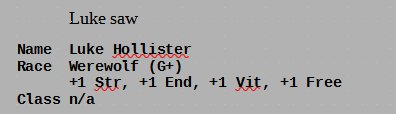
Note that .para4 does have no margin. That’s not quite right, but not the immediate issue.
.para3 { line-height: 120.0000%; margin: 0.0000in 0.0000in 0.0598in 0.2799in; text-indent: -0.0799in;}
No idea where those numbers came from, but also not the issue, right now.
Using shift-arrow to highlight what’s underneath, there is only one character between “Name” and “Luke”. It’s got to be a tab.
The Paragraph Style dialog for the (new) Character Sheet style does have a “Tabs” setting. There is nothing in it. I choose Text Body as its parent style. That also has nothing in the Tabs setting.
Maybe something needs to be there?
The instructions for putting something there are less than clear and the AI is not being helpful.
There are 16 spaces in each of those whitespace spans.
What do the stats look like? That’s where it goes horribly wrong…
<p class="para4"> <span class="span4">Str:</span> <span class="span4"> </span> <span class="span4">11 (11/11)</span> <span class="span4"> </span> <span class="span4">Dex:</span> <span class="span4"> </span> <span class="span4">6 (6/6)</span></p><p class="para4"> <span class="span4">End:</span> <span class="span4"> </span> <span class="span4">10 (10/10)</span> <span class="span4"> </span> <span class="span4">Vit:</span> <span class="span4"> </span> <span class="span4">11 (11/11)</span></p><p class="para4"> <span class="span4">Wis:</span> <span class="span4"> </span> <span class="span4">5 (5/5)</span> <span class="span4"> </span> <span class="span4">Per:</span> <span class="span4"> </span> <span class="span4">5 (5/5)</span></p>
At least I’ve identified the problem. I don’t know what to DO about it, yet.
The amount of whitespace should vary between the spans, not be a constant 16. I wonder where that comes from. It’s a single tab in the original that’s expanding into a fixed number of spaces.
I feel as if I’m arguing about tabs vs spaces in vi, 40 years ago (or the arguments about indentation and parentheses in LISP, ugh). This is not a simple problem, but it’s a very, very old problem.
I suppose I could ask the AI my actual question: How does libre office expand tabs when exporting to epub?
LibreOffice’s EPUB export has a known quirk with tabs, tracked as bug 152469:
Tabs are expanded to 15 non-breaking spaces (
) in the exported HTML. This is a fixed, hard-coded value — it does not respect your document’s tab stop settings ortab-size. The result is usually far too wide, especially for short indents.Regular spaces, by contrast, are collapsed to a single non-breaking space, so multi-space indents are lost.
The underlying issue is that EPUB is HTML-based and the export filter converts the Writer tab character to a fixed run of
entities rather than emitting a<pre>block or a CSStab-sizerule. The bug is still open (status: NEW), so there’s no setting to change the expansion width.
Well then. I’d really rather not join the Libre Office coding group to fix this.
Use a borderless table For column-aligned content, a table with no borders is more reliable than tabs in EPUB output
Good idea – if the spreadsheet would paste decently.
I will try a table and see what happens. Fixing one of them is do-able. This is the starting point. Re-screen-shotted so you can see how ludicrous that width is.
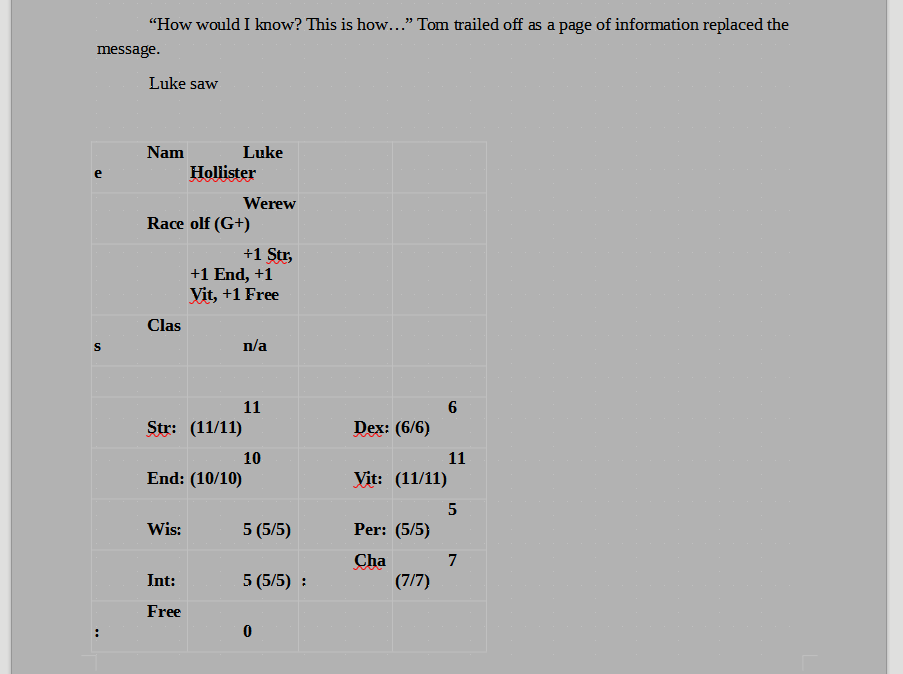
Why would it paste half-width?
Before screwing with it, another AI question: In libre office, how do you prevent spreadsheet pastes into writer from squashing the table?
Best fix: Paste Special
- In Calc, select your cells and Ctrl+C.
- In Writer, place your cursor in an empty paragraph (not inside an existing table).
- Edit → Paste Special (
Ctrl+Shift+V).- Choose Formatted Text (RTF) — this preserves the table structure and column widths.
Let’s see… Nope. Looks exactly the same. The font is bigger, which may be breaking the column widths. Let’s see… Much better, but the column spans of trailing text are still broken.
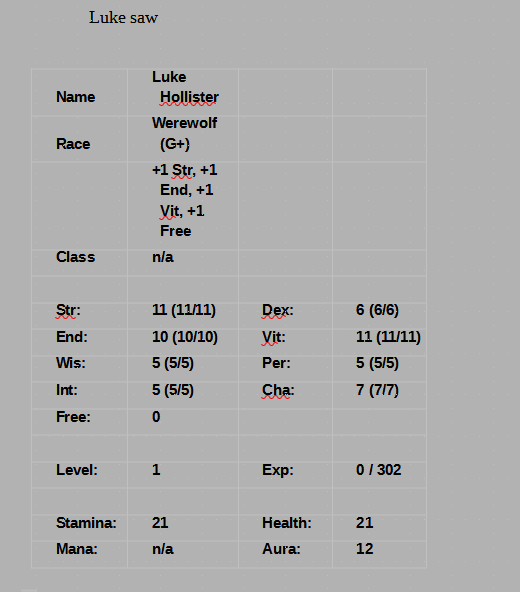
In the spreadsheet, the first three rows column-span right rather than wrap. Three selects and “Merge Right”s fix it. That’s not dreadful for every paste. I don’t put in that many character sheets. I’d prefer something better, but I can work with it.
What happens on export?
Don’t forget to put the paw back!
It previews better in Calibre. Paw restored. Sent to Kindle (after deleting the one already there).
I’m guessing it choked and died on the table. The other attempts were (surprisingly) fast. I feel much better now, having eaten dinner while waiting, but it still has not arrived. No email, either. Perhaps some quota exceeded? But this was only attempt number four, maybe five.
It’s clear that I need two-column character sheets, regardless of mechanism, so I’m going to fight through spreadsheets and leave this problem for another time.
If anyone has made it this far, rejected image: There is something drastically wrong with the background wolf’s head.

